BlogHow to Monitor Website Traffic in 2026: The Ultimate Multi-Tool Monitoring Stack
How to Monitor Website Traffic in 2026: The Ultimate Multi-Tool Monitoring Stack
Standard browser-based tracking is effectively dead in 2026. This guide breaks down how to implement server-side tracking and privacy-first tools to regain 100% visibility.
•7 min read
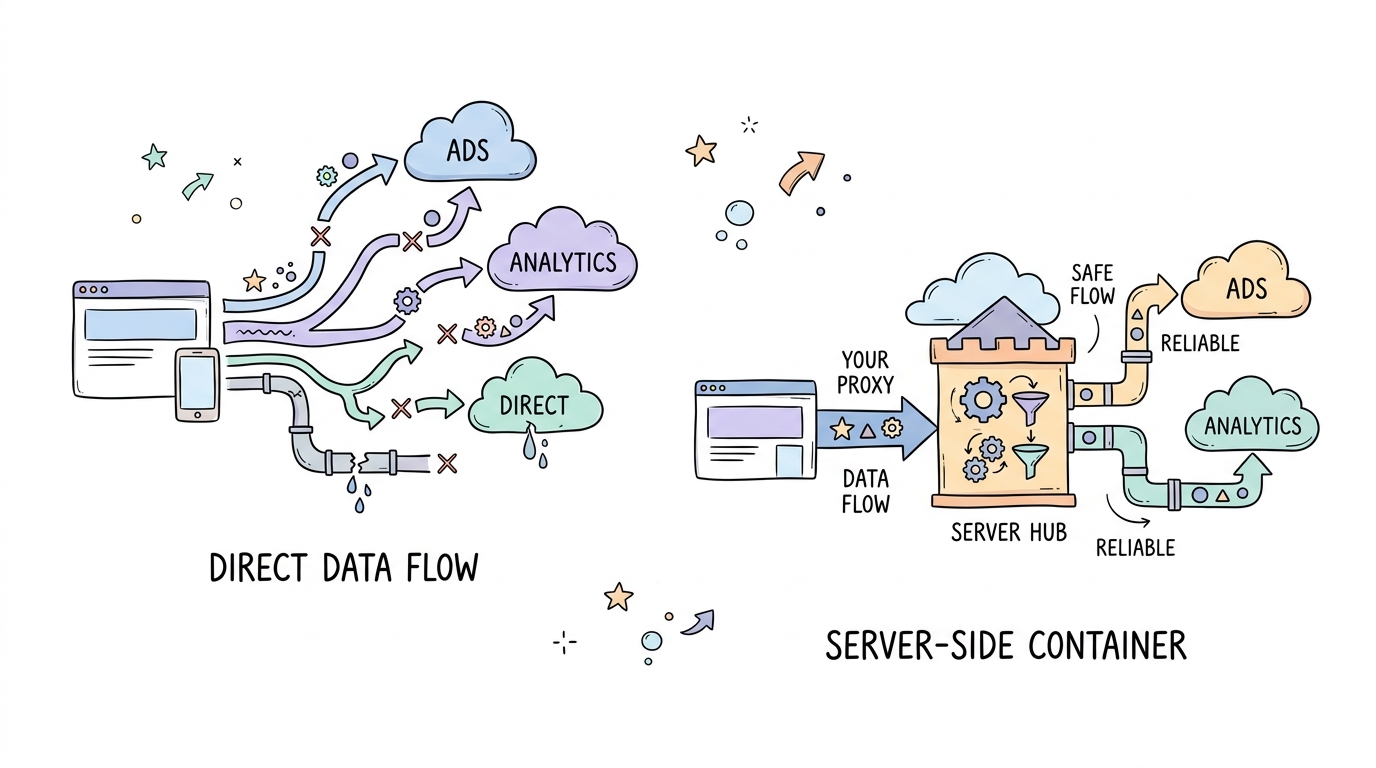
Your analytics dashboard is likely missing nearly half its data. Between aggressive browser privacy updates and ad-blockers, standard client-side scripts are losing 40% of their visibility into user behavior.
Over 70% of global users are concerned about how they are tracked online. This collective shift toward privacy means the old way of dropping a pixel and hoping for the best is officially dead.
The 2026 Traffic Monitoring Playbook at a Glance
Server-Side Tracking (sGTM): Moving data collection from the browser to a cloud server is now mandatory for data accuracy.
First-Party Data: Establish trust by using custom subdomains to bypass third-party cookie restrictions.
Consent Mode V3: This framework is the baseline for legal compliance and ensures your tags respect user choices automatically.
Tool Blending: Combine GA4 with privacy-first or behavioral tools to create a resilient, multi-dimensional view of your traffic.
Step 1: Audit Your Current Gaps and Prep Your Infrastructure
Before you write a single line of code, you must identify where your data is leaking. Most sites lose the most information from users on Safari or those using Brave and various ad-blockers.
You need to audit your current tags to see which ones are failing to fire. Establishing a first-party context requires mapping out your internal data flow before you provision any new servers.
Here is your preparation list:
Identify all current third-party tracking pixels (Meta, TikTok, GA4).
Check your DNS access to ensure you can create new CNAME records.
Evaluate hosting options like Stape sGTM Hosting to handle the server-side heavy lifting.
Document your internal IP addresses to exclude them from production data.
Rule: Never attempt to set up server-side tracking without first confirming you have full DNS control over your primary domain.
Step 2: Deploy a Server-Side GTM Container
The move to Server-Side GTM (sGTM) is the most significant shift in digital marketing since the mobile revolution. Instead of the user's browser sending data directly to Google or Meta, the browser sends it to your server first.
As the Pandectes 2026 Marketer's Guide states: "Server-side tagging has evolved from a technical enhancement into a foundational strategy." This setup acts as a secure gateway where you can clean, anonymize, and control your data before sharing it.
Consider a marketing lead at a SaaS company who noticed a sudden drop in conversion tracking. By switching to server-side tagging, they recovered 35% of lost attribution data because their tags were no longer blocked by browser-level filters.
Here is a walkthrough that covers the key steps:
To configure your server container, you will need to point your web container to a specific transport URL. This URL is your dedicated tagging server address.
# Example of setting a custom transport URL in your GA4 configuration tag
# Path: GTM Web Container > Tags > GA4 Config

server_container_url: "https://metrics.yourdomain.com"
first_party_cookie_domain: "yourdomain.com"
Tip: Start with a small percentage of traffic to your server-side container to monitor server load before a full roll-out.
Step 3: Map Your Custom Subdomain for First-Party Context
Standard tracking relies on third-party cookies that browsers like Safari and Firefox often block within 24 hours. By mapping a custom subdomain like metrics.yourdomain.com, you transform your tracking into a first-party conversation.
This small technical change tells the browser that the data is staying within your ecosystem. It extends cookie life from one day to several months, allowing for accurate long-term attribution.
Pitfall: Failing to map a custom domain means you are still relying on third-party context, which defeats the primary purpose of server-side tracking.
Create a CNAME record in your DNS provider (e.g., Cloudflare or GoDaddy).
Point the record to the endpoint provided by your sGTM hosting provider.
Wait for SSL certificates to provision before enabling the transport URL in GTM.
Step 4: Configure Consent Mode V3 and Privacy Filters
Compliance is not an optional add-on in 2026. Consent Mode V3 allows your website to adjust how tags behave based on the user's specific privacy choices.
If a user rejects cookies, Consent Mode ensures that GA4 only sends anonymous pings for modeling rather than personal identifiers. This keeps your reporting legal and your data flowing even without full consent.
If the user grants consent, then fire all tags normally with full identifiers.
If the user denies consent, then send cookieless pings to allow for basic conversion modeling.
If the user is in a high-regulation zone (like the EU), then prioritize strict server-side PII filtering.
If the CMP has not loaded yet, then hold all tags until a status is determined.
Building Your Stack: Top Tools for 2026 Monitoring
Building a resilient stack requires more than just one tool. You need a mix of measurement, privacy-first analytics, and behavioral insights to see the full picture.
Sarah, an e-commerce owner, realized her data was heavily inflated by internal staff clicks. Implementing a server-side filter allowed her to strip out internal IP traffic before it reached her analytics, leading to cleaner ROI calculations and better ad spend decisions.
Google Analytics 4 (GA4)
Description: The global industry standard for tracking user journeys across devices.
Features: Advanced predictive modeling and deep integration with the Google ecosystem.
Verdict: Essential for most businesses but requires a server-side setup to maintain accuracy in 2026.
Link: Google Analytics 4
Plausible Analytics
Description: A lightweight, open-source alternative that focuses on speed and simplicity.
Features: Fully cookieless by design and compliant with GDPR, CCPA, and PECR out of the box.
Verdict: Best for teams that want clean, high-level metrics without the complexity or privacy baggage of Google.
Link: Plausible Analytics Documentation
Microsoft Clarity
Description: A free behavioral tool that provides visual evidence of how users interact with your pages.
Features: Session recordings and automated heatmaps that highlight user frustration points.
Verdict: An unbeatable free addition to any stack for understanding 'why' users are leaving your site.
Link: Microsoft Clarity
Matomo
Description: A powerful analytics platform that offers 100% data ownership through self-hosting.
Features: Includes SEO vitals, heatmaps, and a familiar interface similar to older analytics versions.
Verdict: The top choice for organizations with strict data residency requirements or those who want to avoid third-party data sharing.
Link: Matomo
Google Search Console
Description: The primary source for understanding how your site performs in organic search results.
Features: Direct data from Google on impressions, clicks, and keyword rankings.
Verdict: Mandatory for monitoring the health of your organic traffic and identifying technical crawling issues.
Link: Google Search Console
Looker Studio
Description: A data visualization platform that blends data from multiple sources into one dashboard.
Features: Dynamic filters and easy sharing of complex data sets from GSC, GA4, and CRMs.
Verdict: The best way to create a 'single source of truth' for your marketing and executive teams.
Link: Looker Studio
Side-by-Side: Choosing the Right Analytics Mix
Tool
Price
Best For
Pros
GA4
Free / Paid
General Measurement
Industry standard, deep integrations
Plausible
Paid
Privacy-First Teams
Fast, lightweight, no cookies
Microsoft Clarity
Free
Behavioral Analysis
Visual heatmaps, session replays
Matomo
Free / Paid
Data Ownership
Full control, self-hosted option
Search Console
Free
SEO Monitoring
Direct Google data, keyword tracking
Looker Studio
Free
Reporting
Blends data from all sources
Step 5: Verify Your Data Flow and QA Your Setup
Once your server is live, you must verify that the data is actually arriving where it should. Most errors occur in the handshake between the web container and the server container.
Open your browser's Network tab and filter for your custom subdomain. If you see requests returning a 200 status code, your server is successfully receiving and processing the data.
Open GTM Preview mode for both Web and Server containers.
Trigger a test event on your website (like a button click).
Confirm the event appears in the Server container summary.
Inspect the Network tab for requests hitting your metrics subdomain.
Check GA4 Real-time reports to see if the data is populating in the final destination.
The Future of Measurement is First-Party
The landscape of website monitoring has shifted from quantity to quality. In 2026, the bedrock of analysis is understanding the difference between raw traffic hits and actual business wins.
By prioritizing a privacy-first, server-side stack, you do more than just fix your data gaps. Companies that prioritize privacy see 20% higher trust scores from their customers. Moving to a first-party data model ensures your measurement strategy survives the death of the cookie while respecting your audience's boundaries. Start auditing your gaps today.
 Kitful