A useful point made halfway through a YouTube tutorial cannot be read as body copy by a text search index. The technical demo, founder advice, or careful explanation stays inside the recording, where people can find it only through the video.
That leaves a gap between the work already done and the pages people search for. A viewer may learn the answer, but someone searching the same question has no article to land on, quote, save, or share.
The raw material is already there: arguments, examples, and proof points that performed well enough to make the video. Turning that material into a structured article gives each idea headings and readable context, so it can appear in search results and serve readers who prefer text.
A transcript alone won't do the job. Spoken delivery includes repetition, detours, filler, and references to a screen the reader cannot see. The useful path is to extract the transcript, rebuild its order around a search query, then edit it into a page that stands on its own.
Video-to-Blog Conversion at a Glance
The fast path still needs an editor.
- Convert the video URL into a structured draft. Vidpipe reports an average draft generation time of 60 to 90 seconds.
- Expect a 20-minute video to produce about 1,000 to 1,500 words, per Tugan.ai.
- Build the article around an intent-led title, clear subheads, and a short summary of the main points.
- Reserve 15 to 20 minutes to remove filler, check facts and names, add links, and prepare the article for publishing.
Prerequisites and Choosing Your AI Conversion Path
Start with a video readers can hear clearly. A public or unlisted YouTube URL with spoken dialogue or captions gives the converter material it can transcribe and organize.
You also need a CMS that accepts Markdown or HTML. WordPress, Ghost, Substack, Medium, and Notion all fit that export requirement.
Pick a Dedicated Converter
A dedicated converter suits a repeatable publishing routine. Vidpipe can process a video URL and offers auto-channel sync, while Video Blog AI supports long-form article generation and an in-editor SEO score.
Choose this route when you want the URL, transcript, structure, and export handled in one flow. Tugan.ai is another dedicated option focused on narrative flow, takeaway boxes, and marketing email reuse.
Pick a General LLM Workflow
ChatGPT, Claude, or Gemini suit an article that needs closer editorial direction. You first collect the transcript, then give the model a detailed instruction covering the reader, search query, outline, tone, and facts it must retain.
This route puts you in charge of structure and wording. It also means transcript extraction and formatting are manual tasks.
For a wider publishing plan, use the same recordings as part of an AI content repurposing strategy. Start with one route and keep it consistent until you know where your review time goes.
Step 1: Extract and Ingest the Video Transcript
Get clean spoken text first. Dedicated converters can parse a YouTube URL directly, and some can sync with a connected channel, so you can move straight from the recording to a draft.
For a manual workflow, use YouTube's transcript view:
- Open the video on YouTube and expand its description.
- Select Show transcript.
- Turn off timestamps, then copy the transcript into a document or your LLM prompt.
- Read the first and last sections before processing. Clear audio and captions give the model a cleaner starting point.
If automatic captions are absent on a new upload, allow YouTube 2 to 4 hours to complete caption generation. That wait is preferable to rebuilding missing spoken context later.
Toololis YouTube to Blog Converter is useful when the transcript arrives as SRT or VTT text. Its browser-based converter removes timing codes and formats clean Markdown without server storage.
A creator with a screen-recorded tutorial faces a common snag: the transcript may say, "as you see on my screen," at the exact moment the steps matter most. Keep that line during extraction so you can locate the moment, then replace it during editing with a screenshot or written instruction.
Before moving on, check these items:
- The copied text has no timestamps or speaker labels.
- The video's key examples and numbers appear in the transcript.
- Any unclear passage is marked for a replay of the original video.
- The transcript belongs to a video you own or are summarizing with clear attribution.
Step 2: Restructure Spoken Dialogue into an SEO Outline
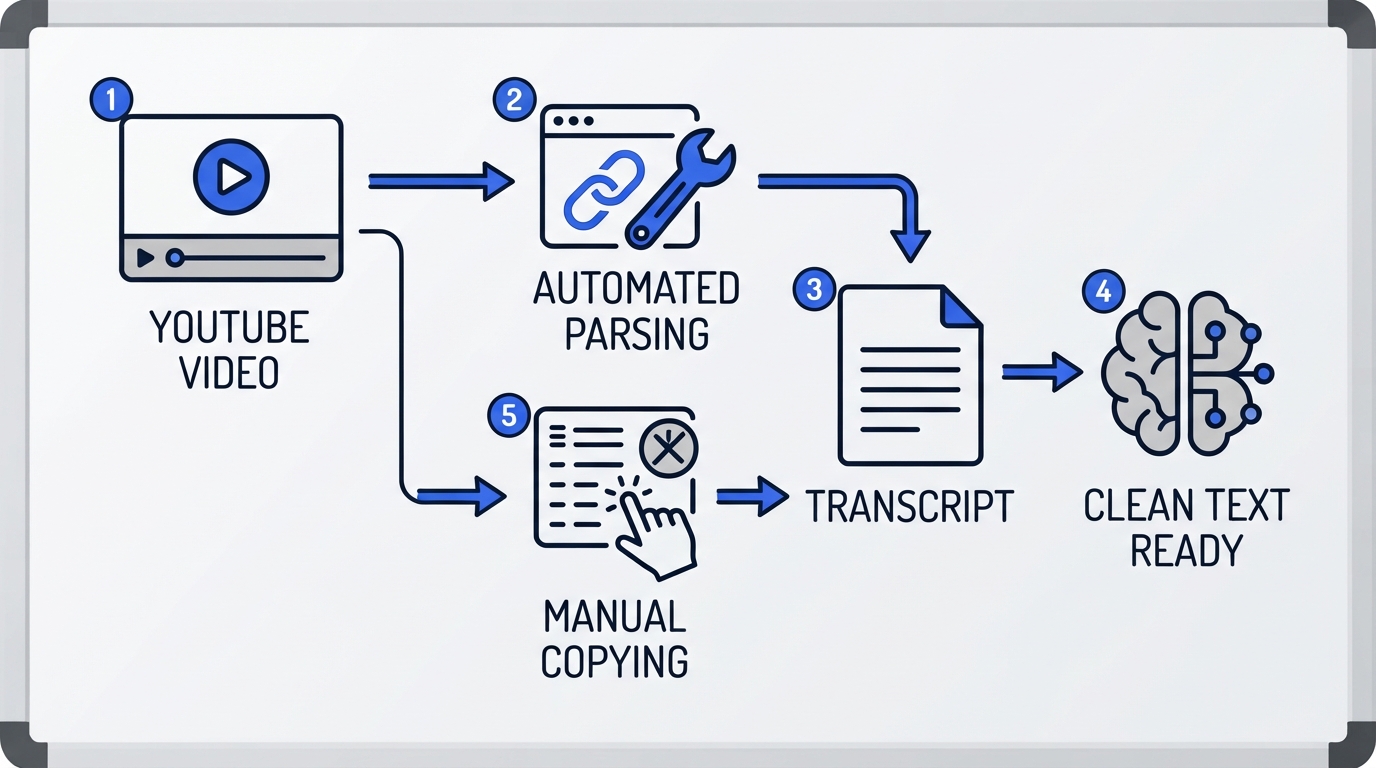
Give the article a reader-first order. A spoken video can wander through setup, side comments, and demonstrations, while a blog post needs an answer-led path that matches the query behind the search.
Begin by identifying the one question the video answers. Write an H1 around that query rather than copying a click-driven video title, then arrange the supporting points into H2 sections that answer the next questions a reader has.
- Write the H1 as a direct search-focused promise.
- Put the direct answer or main method near the start.
- Group related transcript points under H2 headings.
- Use H3 headings only where a section needs a distinct sub-question, example, or process.
- Move repeated remarks into one clear explanation, then cut the duplicates.
A reader should be able to scan the headings and understand the article's route before reading every paragraph. For more help with this structure, see our guide to on-page SEO heading architecture.
Use short paragraphs after the outline is set. Each paragraph should carry one idea from the video, with enough written context that it makes sense away from the recording.
Use a Repeatable Prompt
Tugan.ai focuses its conversion around narrative flow and key takeaway boxes. Whether you use it or a general LLM, a fixed instruction keeps the model from preserving the transcript's loose order.
Turn this YouTube transcript into a blog post for readers searching for [primary query]. Write a clear H1, logical H2 and H3 headings, short paragraphs, and a brief takeaway section. Remove filler, timestamps, speaker labels, and references to a screen. Keep every specific number, product name, example, and proprietary step accurate. Do not add facts that are absent from the transcript.
The model should organize the material, not invent missing proof. Replay the video whenever the transcript leaves a claim unclear.
Step 3: Refine Narrative Tone, Examples, and Visual Assets
Spend 15 to 20 minutes on the draft. Toololis identifies that as the usual editing window for turning generated copy into publish-ready prose, and it is where the article earns its place on your site.
Read once with the video open. Remove verbal crutches such as "um," "like I said," and "let me show you on screen," then turn any remaining visual reference into a written explanation or a visual asset.
- Replace a screen reference with a high-resolution screenshot from the video.
- Use a custom diagram when the video explains a process that needs labels or sequence.
- Keep real-world figures, client case studies, and proprietary steps that the speaker states.
- Check the spelling and context of statistics, formulas, and product names against the recording.
- Embed the original YouTube video so readers can watch the source material.
Repurpuz AI parses transcripts around on-page SEO conventions, but its draft still needs this editorial pass. The generator can arrange words quickly; only a review can tell whether a reader can follow the explanation without watching.
Think of a webinar host explaining a setup in front of a dashboard. A paragraph that preserves "click this button here" gives a reader no usable direction. A screenshot with a caption, or a sentence naming the control and its purpose, carries the same instruction into the written format.
Keep the speaker's point of view where it adds proof. Their specific example is usually stronger than a generic replacement.
Step 4: Optimize On-Page SEO and Export to Your CMS
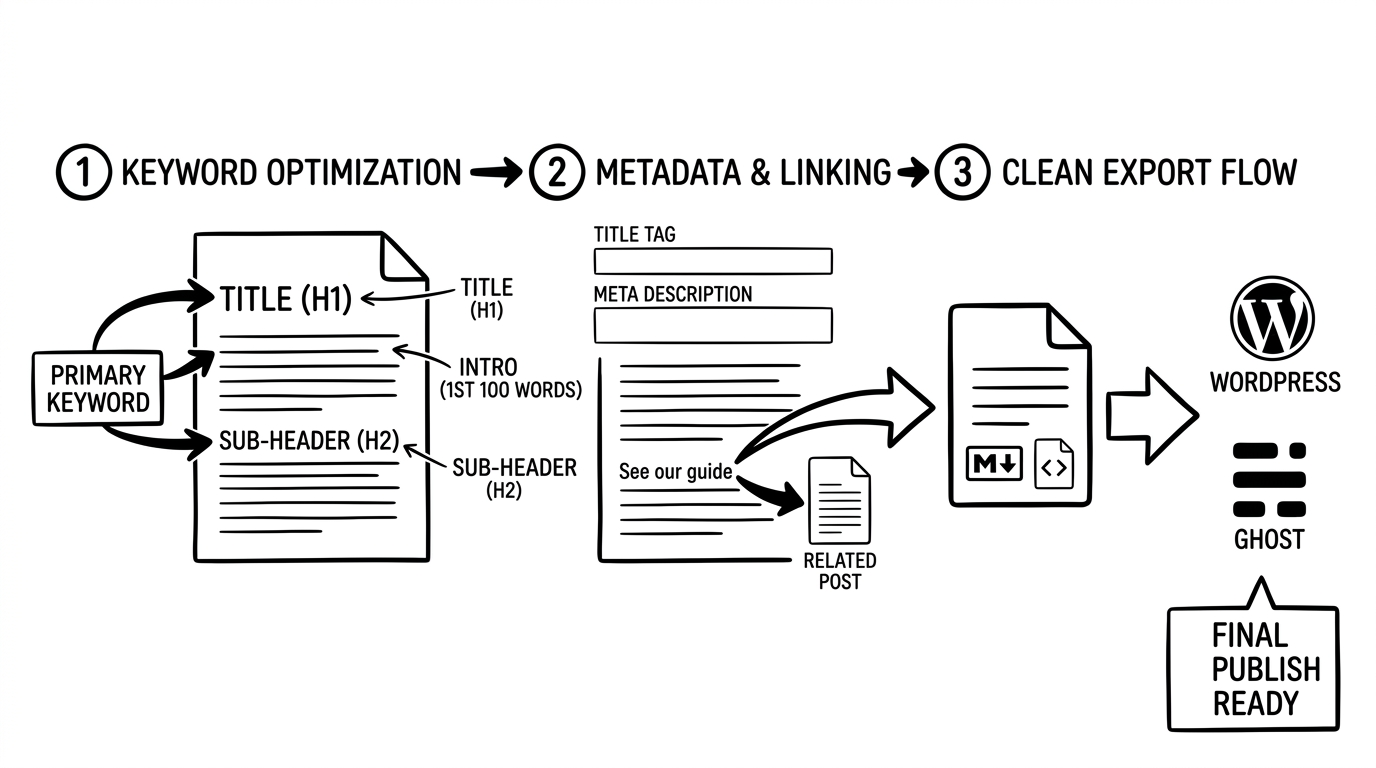
Publish cleanly the first time. Export Markdown or HTML, then check the rendered page in your CMS before scheduling it.
Use the export format your CMS accepts so headings, lists, and links arrive without avoidable formatting errors. WordPress, Ghost, and Substack can take a clean Markdown or HTML draft.
- Put the primary search phrase in the title and within the first 100 words where it reads naturally.
- Use the phrase in relevant H2 headings that genuinely answer parts of the query.
- Add internal links to related guides and outbound links to tools or documentation cited in the video.
- Add a title, description, and the embedded original video.
- Review readability, article depth, and keyword placement in the converter's SEO score before scheduling.
yt2post.ai produces blog and social-post formats through credit-based monthly plans. A multi-format draft can save a second round of copying when the same recording also needs a social post.
Internal links give readers a next page to visit after the video-derived article answers its main question. Use them by topic, not by habit. Our guide to an internal linking strategy for blogs can help you choose relevant pages.
Before publishing, run this final check:
- The title and first paragraph match the page's search intent.
- Every heading describes the section beneath it.
- Links work and lead to relevant pages.
- The embedded video plays on the published page.
- Markdown or HTML renders without broken lists or heading levels.
Dedicated AI Converters vs. General LLM Prompts: Which Should You Use?
Dedicated converters win for high-volume publishing, while general LLM prompts win for articles that need close editorial direction. The deciding factor is how much manual transcript handling and prompt work you want to take on.
Dedicated Converters
Vidpipe, Video Blog AI, and Tugan.ai process video URLs as part of the conversion flow. They can handle automated URL parsing, channel syncing, image extraction, and one-click CMS export.
- Vidpipe uses pay-per-credit pricing at $20 for 10 credits.
- Video Blog AI supports up to 3,000-word articles, 175+ languages, and SEO scoring from 0 to 100.
- Tugan.ai focuses on narrative flow, key takeaway boxes, and marketing email repurposing.
- yt2post.ai lists credit-based plans starting at $4.99/month.
This route fits a video backlog where speed and repeatable exports matter. Junia AI is another URL-based video-to-blog option to assess alongside those flows.
General LLM Prompts
Claude and Gemini require you to bring the transcript and give clear instructions. In return, you can set the outline, tone, examples, and final format with much closer control.
- Copy the transcript manually from YouTube or a transcript cleaner.
- Use a fixed prompt that tells the model which query and headings to target.
- Review the result against the recording before it reaches the CMS.
- Use an already active LLM plan or API access without adding a dedicated converter subscription.
This route fits a flagship guide, interview, or technical piece where each section needs a deliberate editorial shape. Pick the dedicated route for volume; pick the prompt route when the draft needs hands-on direction.
Mistakes That Ruin AI-Converted Video Articles
A transcript with headings can still read badly. These mistakes leave readers with the spoken version of a video rather than a useful article.
- Publishing the transcript: Rewrite repeated points into one clear explanation and arrange them around the reader's question.
- Leaving verbal filler: Delete phrases such as "like I said" and "um" during the editorial pass.
- Keeping screen references: Replace "as you can see here" with a written instruction, screenshot, or diagram.
- Reusing the video title: Write an intent-matched search title instead of carrying over click-driven phrasing.
- Dropping the source video: Embed the original YouTube video and link back to the channel where appropriate.
The last check is simple: read the article without pressing play. If a step relies on a missing visual, an undefined name, or a repeated aside, edit that passage before publishing.
Search readers expect a page to answer the question in front of them. A clean rewrite gives them that answer while the embedded video remains available for anyone who wants the full demonstration.
Frequently Asked Questions
Can I Convert Any YouTube Video or Only My Own?
Focus on videos you own. Public summaries need clear attribution, and the written piece should accurately represent the original material.
Does Google Penalize AI-Generated Blog Posts?
Google ranks helpful, high-quality content regardless of how it was generated. The article still needs accurate facts, clear writing, and a useful answer for the reader.
Educational guides, webinars, and interviews work well because they contain spoken explanations that can be organized into sections. Videos from 5 minutes to multiple hours can be converted, while Video Blog AI supports video processing in 175+ languages and some high-capacity platforms support videos up to 7 hours.
Do I Need to Download Video Files or Transcribe Manually?
No, dedicated converters can process a raw YouTube URL directly. Manual transcript copying is mainly useful when you want to control the prompt in Claude or Gemini.
How Long Does a Video-to-Blog Draft Take?
A structured raw draft can take 60 to 90 seconds after you submit the URL, according to Vidpipe. Plan additional editing time before the article is ready to publish.
Should I Keep Timestamps in the Article?
Remove timestamps, speaker labels, and SRT timing artifacts from the body copy. Keep the original video embedded if readers need to watch a particular demonstration or hear the speaker's full context.
Start Turning Your Video Backlog into Search Traffic
Choose one educational video that has already earned attention, then run its URL through your chosen converter or transcript prompt. Build the article around the search question it answers, edit the draft, add the original video, and publish it in your CMS today.
Your first goal is one useful indexed page. That gives the spoken ideas in your video a second way to reach readers.
 Kitful