BlogTopical Mapping Tools for Content: Free vs. Paid Options Compared
Topical Mapping Tools for Content: Free vs. Paid Options Compared
Building topical authority requires structured topic clusters rather than isolated keywords. This guide compares free manual methods, budget AI tools, and enterprise semantic platforms to help you choose the right mapping workflow.
•13 min read
23% is the average organic traffic increase over 12 months for pages organized into topic clusters rather than individual keywords. That gap matters because a publishing calendar built from isolated keywords can leave whole parts of a subject uncovered.
A topical map gives the work a structure: one pillar topic, related subtopics, target queries, intent, and links between the pages. The result is a publishing plan that shows what to write first and where each article belongs.
Search now evaluates coverage through entity and attribute relationships, including entities associated with Google's Knowledge Graph. A map helps you connect those relationships instead of repeating a phrase across loosely related posts.
It also gives AI search systems clearer material to draw from. More than 34% of SEO professionals use large language models in topical research workflows, which reflects the shift toward planning coverage before drafting.
The practical change is simple. Start with the subject your site needs to own, map its commercial, informational, and supporting questions, then publish linked pages in an intentional order. Random keyword targets rarely produce that same structure.
Topical Map Tools at a Glance
Free research gives you control. Paid tools save planning time and add entity, volume, or publishing features.
Google Sheets for zero-cost control: combine Autocomplete, People Also Ask, and Search Console exports in a 10-column map that tracks clusters, H1s, intent, URLs, and internal links.
Marvlus for existing-site checks: scan a domain in 60 seconds, map URLs to target keywords, and score topical coverage without a subscription.
Topiq for one-off planning: pay $29 per map for 50+ Knowledge Graph entities, 15 to 18 clusters, and 15 BOFU-first briefs.
Topical Map AI for higher map volume: Starter is $56 per month for 30 maps and 800 to 1,200 keywords per map, with live search volume.
Search Atlas and Semrush for suite workflows: these pair map building with broader research, content, audit, and publishing work. Semrush plans begin at $139.95 per month.
A short walkthrough of topic-cluster setup can help before you choose a workflow.
Use a spreadsheet when the map itself is the project. Choose a paid option when the map must feed briefs, audits, client exports, or a busy publishing schedule.
What Topical Mapping Tools Actually Do
A cluster has a job. It connects the questions around a subject instead of merely grouping similar phrases.
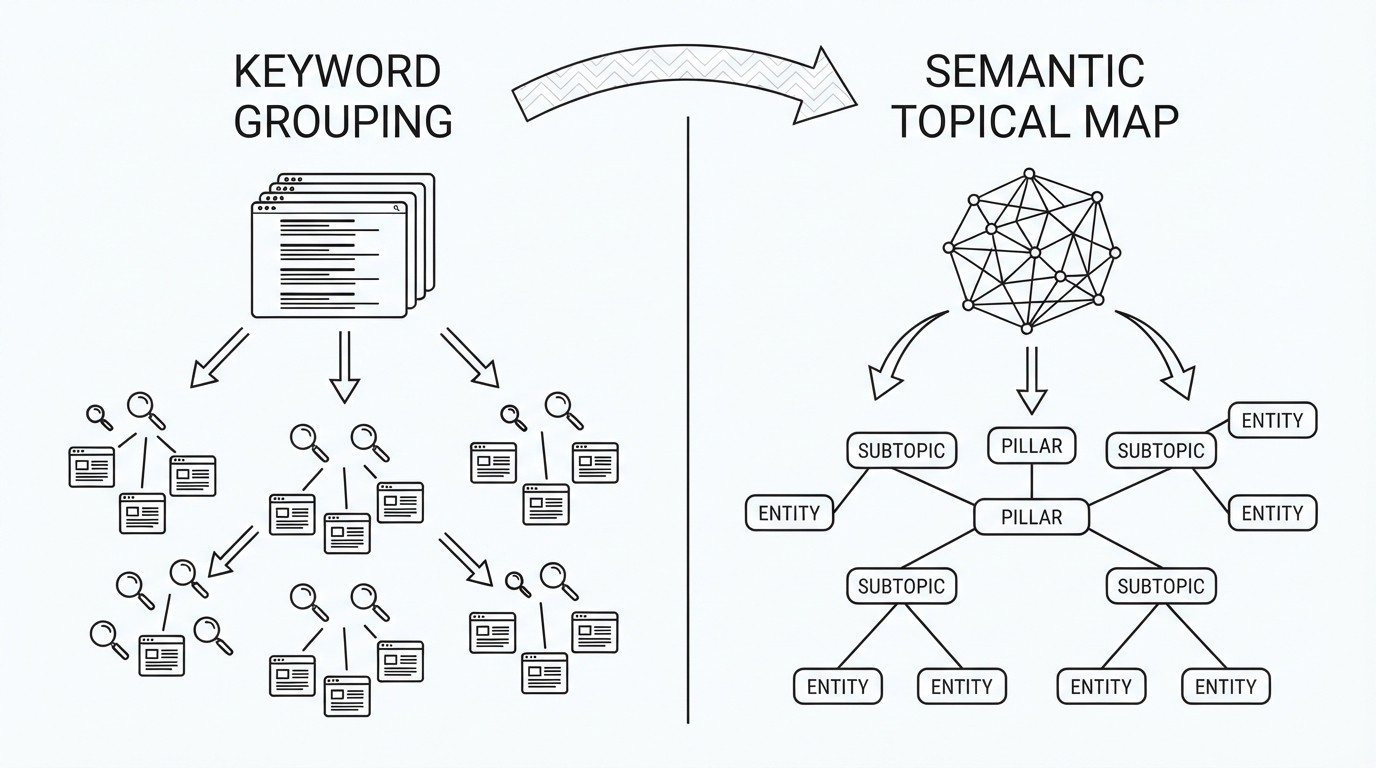
Standard keyword clustering usually groups terms that share search-result URLs. That is useful for spotting pages that can rank together, but it does not decide the site architecture. A topical map adds parent and child relationships, then assigns each cluster a place in a pillar-and-spoke structure.
A complete map commonly includes:
A pillar topic that defines the main hub page.
Subtopic nodes that support that pillar without duplicating its H1 topic.
Intent tags for TOFU, MOFU, and BOFU pages.
Recognized entities and related attributes.
Internal-link directions between pillars and supporting pages.
Brief requirements that set the page's lexical boundaries.
Google's Knowledge Graph contains 54B+ entities, so entity coverage has become a useful check on whether a topic plan is broad enough. The goal is not to mention every related entity. It is to cover the entities that belong to the reader's question and the page's purpose.
Picture a site about topical mapping. Its pillar page explains the method, while supporting pages cover entity research, intent tags, content briefs, and internal-link paths. Each page answers a distinct question and points back to the pillar where appropriate.
This is where semantic SEO and entity optimization moves beyond a keyword export. The map sets publication priority, protects against overlapping targets, and gives writers a clear brief before they begin.
Best Free Topical Mapping Tools and Workflows
Free options work well for a first map, a small site, or a team that wants to make every planning call itself. The tradeoff is time: manual research and cleanup can take 10 to 20 hours.
Pros
Zero-dollar workflow using Search Console, Autocomplete, People Also Ask, and a spreadsheet.
Full control over cluster names, intent, H1s, URLs, and link paths.
A 10-column sheet can track Cluster, H1, Primary KW, Intent, URL, and Internal Links.
Cons
Manual data cleaning takes substantial time.
No automated entity validation.
Pricing
Manual workflow: free ($0).
Why Choose Google Sheets Over Paid Tools?
Choose this route when the budget is zero and you need to inspect every target by hand. It is strongest for a focused project where strategic control matters more than speed.
Marvlus suits an established site that needs its current pages mapped before new content is planned. Its free generator scans an existing domain in 60 seconds, maps URLs to target keywords, and scores current topical coverage.
Pros
Existing-domain scan in 60 seconds.
URL-to-keyword mapping.
Current topical optimization scoring.
Cons
Built around an existing domain audit.
Does not provide the paid-tool brief volume described for dedicated map products.
Pricing
Free generator: no subscription.
Why Choose Marvlus Over Google Sheets?
Pick Marvlus when you need a fast view of existing URLs. A spreadsheet is better when you are starting from raw research and building the map manually.
Topical Map AI Free Generator is for testing a dedicated generator before committing to a monthly plan. The free trial creates three full maps with clustered keywords and content briefs, with no credit card required.
Pros
Three full topical maps.
Clustered keywords and content briefs.
No credit card required.
Cons
Limited to three maps.
Higher-volume plans require a monthly subscription.
Pricing
Free trial: three full maps.
Why Choose Topical Map AI Free Trial Over Manual Research?
Use the trial when you want to see an automated map and brief format before building a process around it. Manual research remains the better fit for unlimited zero-cost planning.
Topiq's free sample is a quick way to inspect live Google data before buying a report. It creates three sample clusters and Knowledge Graph entities in approximately 20 seconds without registration.
Pros
Three sample clusters from live Google data.
Knowledge Graph entity output.
No registration required.
Cons
Limited to sample clusters.
Full map reports are paid one-off purchases.
Pricing
Free sample: three sample clusters.
Why Choose Topiq Free Sample Over Other Free Options?
Choose it when entity output is the first thing you want to inspect. The sample gives a faster preview than manual research, while the full report is a separate purchase.
Top Dedicated Paid Topical Mapping Software
Dedicated mapping products focus their work on the plan itself: entities, clusters, briefs, priority, and links. They fit teams that need a clear publishing architecture before writers start.
Topical Map AI is aimed at recurring map production, with live search volume, custom sitemap imports, and a bring-your-own API key option.
Pros
Live DataForSEO search volume.
Custom sitemap imports.
CSV, PDF, and Google Docs exports.
Cons
Starter plans require a monthly subscription.
White-label PDF exports begin on Pro.
Pricing
Starter ($56/month): 30 maps and 800 to 1,200 keywords per map.
Pro ($104/month): 100 maps, white-label PDF, and 2 to 3 minute processing.
Business ($179/month): 200 maps, three seats, and API access.
Agency ($374/month): 500 maps and 10 seats.
Why Choose Topical Map AI Over Topiq?
Choose it for repeat map production and client-facing exports. Topiq fits a single map purchase, while this option has plans built around ongoing volume.
Topiq is the direct choice for a one-time semantic map. Each $29 report mines 50+ Knowledge Graph entities, 30+ conversational queries, 15 to 18 clusters, and 15 ready-to-write briefs ordered BOFU first.
Pros
$29 flat fee per map.
50+ Knowledge Graph entities.
BOFU-first brief priority.
Cons
One map per purchase.
Does not include the multi-seat plans offered by Topical Map AI.
Pricing
Per map ($29): entity research, clusters, conversational queries, and 15 briefs.
Why Choose Topiq Over Topical Map AI?
Buy Topiq when a commercial or comparison-page plan needs to move first without adding a recurring bill. Its BOFU-first order suits affiliate and lead-generation work.
Beetopic combines map building with article production and WordPress publishing. It suits a team that wants the map to feed a production workflow.
Pros
Internal link builder.
WordPress publishing automation.
Seven-day free trial.
Cons
Starter includes two maps per month.
Article limits vary by plan.
Pricing
Starter ($99.95/month): two maps and 10 articles per month.
Growth ($399.95/month): three maps and 30 articles per month.
Pro ($499.95/month): 10 maps and 60 articles per month.
Why Choose Beetopic Over Topical Map AI?
Choose Beetopic when direct WordPress publishing is part of the requirement. Topical Map AI is better aligned with map volume, exports, and client workflows.
StratiPage turns keyword clusters into topic maps and adds content-priority scoring, sitemap-based contextual links, and direct WordPress publishing. It fits a site that wants the plan tied closely to its existing pages.
Pros
Keyword clustering into topic maps.
Content-priority scoring.
Sitemap-based contextual internal-link insertion.
Cons
Pricing details are not listed here.
Direct WordPress publishing is the stated publishing path.
Pricing
Starting price: -
Why Choose StratiPage Over Topiq?
Choose StratiPage when contextual link insertion and WordPress publishing are part of the same process. Topiq is the tighter choice for a one-time entity-led report.
All-in-One SEO Suites and Enterprise Semantic Platforms
Suite products make sense when mapping must sit beside keyword research, content work, audits, and publishing. You pay for a wider working environment, then decide whether its map depth fits your subject.
Search Atlas Topical Map Generator connects interactive diagram and table views to Brand Vault tone controls, the Content Genius writing engine, and direct WordPress publishing.
Pros
Interactive diagram and table views.
Brand Vault tone controls.
Content Genius and direct WordPress publishing.
Cons
Topical mapping is part of a broader SEO suite.
Starting price is not listed here.
Pricing
Starting price: -
Why Choose Search Atlas Over Dedicated Mapping Software?
Choose Search Atlas when the map must connect directly to writing and WordPress publishing. A dedicated map product is the more focused purchase when planning is the main need.
Semrush includes Keyword Strategy Builder in plans starting at $139.95 per month, or $117.33 per month when billed annually. It groups keywords by domain relevance, personal keyword difficulty, and intent.
Pros
Keyword Strategy Builder within a full SEO suite.
Intent grouping and domain relevance.
5.5B+ keyword database.
Cons
Distinct sub-clusters can be conflated in nuanced niches.
Monthly cost is higher than dedicated one-off maps.
Choose Semrush when its keyword database and full SEO-suite work are already central to your process. Search Atlas is the closer fit for a map connected to Brand Vault, Content Genius, and WordPress.
InLinks starts at $49 per month and is built for entity SEO and semantic knowledge graphs. It analyzes entity co-occurrence and automates internal-link schema across pages.
Pros
Entity co-occurrence analysis.
Semantic knowledge graph focus.
Automated internal-link schema.
Cons
Starts with a monthly subscription.
Pricing detail beyond the starting tier is not listed here.
Pricing
Starting price ($49/month): entity SEO and internal-link schema.
Why Choose InLinks Over Semrush?
Choose InLinks when entity relationships and internal-link schema are the main work. Semrush is better suited to a broader SEO research and planning stack.
Topical Mapping Software Comparison Matrix
The free-to-paid divide is clearest in automation. Manual research costs no money but has no entity extraction; paid options add structured outputs, volume data, exports, or publishing connections.
Tool
Starting price
Free access
Entity extraction
Volume data
Exports
Best for
Google Sheets / Manual
$0
Yes
No
Manual
-
Zero-budget planning
Marvlus
Free
Yes
-
Google ranking integration
-
Existing-site audits
Topical Map AI
$56/month
Three maps
-
Live DataForSEO
CSV, PDF, Google Docs
Recurring map production
Topiq
$29/map
Sample clusters
50+ entities
Live Google data
Interactive map
One-off BOFU plans
Beetopic
$99.95/month
Seven-day trial
-
-
-
WordPress production
StratiPage
-
-
-
-
-
Map-to-publishing workflow
Search Atlas
-
-
Semantic analysis
-
-
Suite publishing workflow
Semrush
$139.95/month
-
-
5.5B+ keywords
-
Full SEO suite
InLinks
$49/month
-
Entity co-occurrence
-
-
Entity SEO and links
Topiq is the lowest stated paid entry point for a complete one-off map. Topical Map AI adds recurring map capacity, while Beetopic, Search Atlas, and StratiPage put more weight on publishing connections.
The table also shows why a spreadsheet remains valid. It gives you full editorial control, but you must collect, clean, validate, and organize the research yourself.
How to Choose the Right Topical Mapping Tool
Choose based on the site you have and the work that follows the map. A new site needs a content architecture; an older site often needs a page audit before it needs more drafts.
If you are launching a niche site or blog, then begin with Topical Map AI's three free maps or Topiq's $29 report before publishing the first article.
If affiliate or lead-generation pages need to earn sooner, then choose Topiq because it puts commercial and comparison briefs first.
If you are auditing a domain with many existing URLs, then use Marvlus or Search Atlas to map current pages, find gaps, and place URLs against target clusters.
If an agency publishes 50+ articles each month, then choose Topical Map AI Pro or Business for white-label PDF exports and batch processing.
If direct WordPress publishing is required, then choose Beetopic or StratiPage.
A quick calculation helps with recurring plans. Topical Map AI Pro costs $104 per month for 100 maps, which works out to $1.04 per available map when the monthly allowance is used. Business costs $179 for 200 maps, or $0.895 per available map.
Map quality still needs a human check. Use the same core review for every option:
Confirm cluster pages have distinct search intent and non-overlapping H1 topics.
Check that each supporting article links contextually to its pillar page.
Match primary entities to recognized Google Knowledge Graph nodes.
Add TOFU, MOFU, or BOFU labels to every brief.
Set lexical boundaries so writers do not blend neighboring clusters.
For affiliate silos, the map's links deserve as much attention as its keywords. Our framework for internal linking structure for SEO shows how to turn pillar-and-spoke relationships into a working site structure.
The practical rule is straightforward: pay for automation only when the saved planning work, map volume, or publishing connection has a clear place in your process.
Frequently Asked Questions About Topical Mapping Tools
What Is the Difference Between a Keyword List and a Topical Map?
A keyword list collects search terms, often alongside search volume, but it does not show which pages should support one another or which terms address the same intent. A topical map turns those terms into a hierarchical blueprint: it assigns pillar pages and subtopic clusters, connects recognized entities and their attributes, sets TOFU, MOFU, or BOFU intent, sequences publication, and defines contextual internal links.
Can You Build a Topical Map for Free?
Yes: collect ideas from Google Autocomplete and People Also Ask, combine them with Search Console queries, then group the results in Google Sheets around a core theme, a pillar page, and distinct supporting intents; Marvlus and Topical Map AI also offer free options or sample maps. The tradeoff is time and validation, since a manual workflow requires you to check for overlapping H1 topics, keyword cannibalization, entity relevance, and whether every supporting page links back to its designated pillar.
How Many Articles Should a Topical Map Include?
A complete map typically contains 30 to 100 articles across four to eight core topic clusters, while an AI-generated seed map often starts with 15 to 25 pillar and supporting briefs. Start with the coverage needed to answer the major questions around one core entity, then expand only where each new article has a separate intent, clear lexical boundaries, and a useful internal-linking role rather than creating near-duplicate pages.
Do Topical Maps Improve Visibility in AI Overviews and ChatGPT?
Yes, entity-led coverage gives AI systems clearer material to extract when people ask detailed conversational questions, especially when pages explain a topic and its related entities in a connected cluster. Queries of eight or more words are 7x more likely to trigger AI Overview citations, so map pages around complete answers, recognized Knowledge Graph entities, and contextual links instead of treating each phrase as an isolated target.
Next Steps: Launching Your Topical Authority Plan
Start with one seed topic today. Build a free map or buy a small one-off report, check the entities and intent labels, then draft the pillar page and its supporting spokes in a planned order.
Keep every supporting page connected to its pillar through contextual internal links. That structure gives your content a coherent place to grow from.
 Kitful